


Data Types#
Trajectory#
Module handling the trajectory data of the analysis.
- class TrajectoryData#
Trajectory Data.
Wrapper around the trajectory data, holds the data as a data frame.
Note
The coordinate data is stored in meter (‘m’)!
- Parameters:
data (pd.DataFrame) – data frame containing the data in the form: “id”, “frame”, “x”, “y”
frame_rate (float) – frame rate of the trajectory file
- data#
data frame containing the trajectory data with the columns: “id”, “frame”, “x”, “y”, “point”
- Type:
pd.DataFrame
- data: pandas.DataFrame#
- property bounds: tuple[float, float, float, float]#
Minimum bounding region of all points in the trajectory.
Geometry#
Module handling the geometrical environment of the analysis.
- class WalkableArea(polygon, obstacles=None)#
Class holding the geometry information of the analysis.
The walkable area is the area in which the pedestrians can walk, only pedestrians inside this area are considered in the analysis. Parts which are obstructed and/or can not be reached by the pedestrians can be excluded.
Walkable area need to be simple and cover a non-zero area.
Creates a walkable area.
- Parameters:
polygon (Any) – A sequence of (x, y) numeric coordinate pairs, or an array-like with shape (N, 2). Also, can be a sequence of
shapely.Pointobjects. Passing a str sequence containing a Well-Known Text (wkt) format representation of a polygon is also allowed.obstacles (Optional) – list of sequences of (x, y) numeric coordinate pairs, or an array-like with shape (N, 2). Also, can be a sequence of
shapely.Pointobjects.
- property coords#
Coordinates of the walkable area’s points.
- Returns:
Coordinates of the points on the walkable area
- property area#
Area of the walkable area.
- Returns:
Areas of the walkable area
- property polygon#
Walkable area as
shapely.Polygon.- Returns:
Walkable area as
shapely.Polygon.
- property bounds#
Minimum bounding region (minx, miny, maxx, maxy).
- Returns:
Minimum bounding region (minx, miny, maxx, maxy)
- class MeasurementArea(coordinates)#
Areas to study pedestrian dynamics.
A measurement area is defined as an area, which is convex, simple, and covers a non-zero area.
Create a measurement area from the given input.
The measurement area may be a convex, simple area which covers a non-zero area.
- Parameters:
coordinates (Any) – A sequence of (x, y) numeric coordinate pairs, or an array-like with shape (N, 2). Also, can be a sequence of
shapely.Pointobjects. Passing a str sequence containing a Well-Known Text (wkt) format representation of a polygon is also allowed.
- property coords#
Coordinates of the measurement area’s points.
- Returns:
Coordinates of the points on the measurement area
- property area#
Area of the measurement area.
- Returns:
Areas of the measurement area
- property polygon#
Measurement area as
shapely.Polygon.- Returns:
Measurement area as
shapely.Polygon.
- property bounds#
Minimum bounding region (minx, miny, maxx, maxy).
- Returns:
Minimum bounding region (minx, miny, maxx, maxy)
- class AxisAlignedMeasurementArea(x_min, y_min, x_max, y_max)#
Axis-aligned areas to study pedestrian dynamics.
An axis aligned measurement area is defined as an area, which is axis-algined, convex, simple, and covers a non-zero area.
Create an axis-aligned measurement area from the given input.
Creates a rectangular axis-aligned measurement area using the provided coordinates. The resulting area must be valid and have a non-zero area. Raises a GeometryError if the polygon cannot be created or is invalid.
- Parameters:
- Raises:
GeometryError – If the measurement area cannot be created or is invalid.
- classmethod from_measurement_area(measurement_area)#
Create an AxisAlignedMeasurementArea from a MeasurementArea.
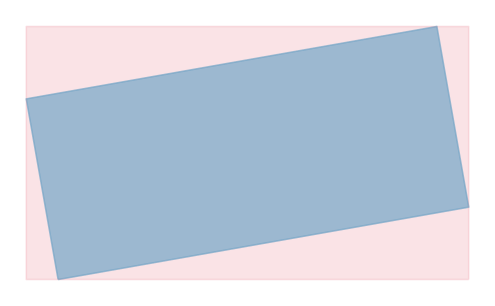
This method creates an axis-aligned measurement area that bounds the given measurement area. Given the blue measurement area in the following figure, the axis-aligned measurement area is the red rectangle that covers the blue area. The axis-aligned measurement area is defined by the minimum and maximum x and y coordinates of the measurement area.
- Parameters:
measurement_area (MeasurementArea) – The measurement area from which to create the axis-aligned measurement area.
- Returns:
- An instance of
AxisAlignedMeasurementArea that bounds the given measurement area.
- Return type:
- class MeasurementLine(coordinates)#
Line segments, which are used to analyze pedestrian dynamics.
A measurement line is defined as line segment between two given points with a non-zero distance.
Create a measurement line from the given input.
The measurement line may only consist of two points with a non-zero distance.
- Parameters:
coordinates (Any) – A sequence of (x, y) numeric coordinate pairs, or an array-like with shape (N, 2). Also, can be a sequence of
shapely.Pointobjects. Passing a str sequence containing a Well-Known Text (wkt) format representation of a LineString is also allowed.
- property coords#
Coordinates of the measurement line’s points.
- Returns:
Coordinates of the points on the measurement line
- property length#
Length of the measurement line.
- Returns:
Length of the measurement line
- property xy#
Separate arrays of X and Y coordinate values.
- Returns:
Separate arrays of X and Y coordinate values
- property line#
Measurement line as
shapely.LineString.- Returns:
Measurement line as
shapely.LineString.
- normal_vector()#
Compute and returns the normalized normal vector of the line.
- Returns:
A 2D NumPy array representing the normalized normal vector of the line in the form [x, y].
- Return type:
NDArray[np.float64]