


Analysis Methods#
Core measurements#
Density#
Module containing functions to compute densities.
- compute_classic_density(*, traj_data, measurement_area)#
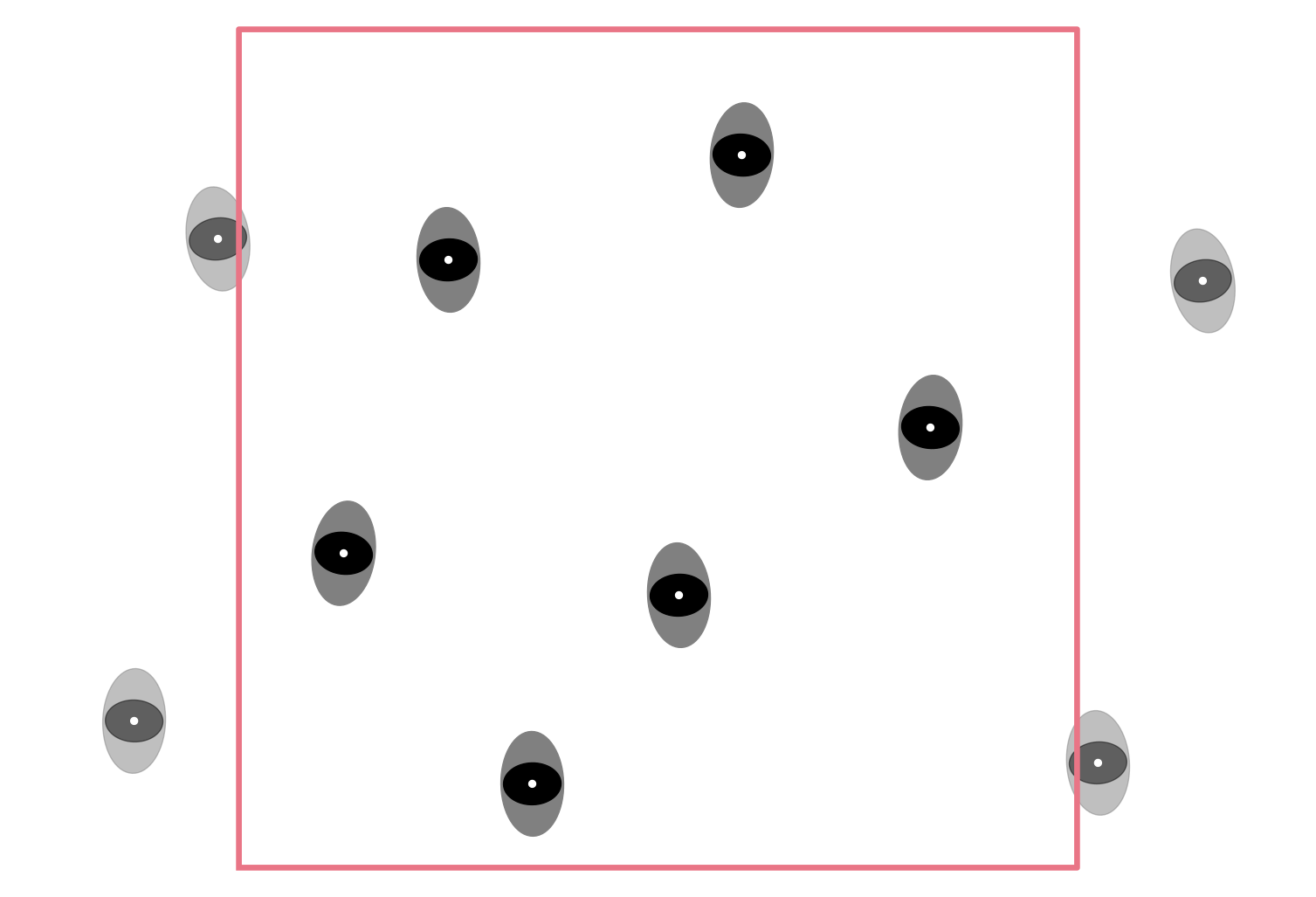
Compute the classic density per frame inside the given measurement area.
The classic density \(\rho_{classic}(t)\) is the number of pedestrians inside the given measurement area \(M\) at the time \(t\), divided by the area of that space \(A(M)\):
\[\rho_{classic} = {N \over A(M)},\]where \(N\) is the number of pedestrians inside the measurement area \(M\).
- Parameters:
traj_data (TrajectoryData) – trajectory data to analyze
measurement_area (MeasurementArea) – area for which the density is computed
- Returns:
DataFrame containing the columns ‘frame’ and ‘density’ in \(1/m^2\)
- Return type:
- compute_voronoi_density(*, individual_voronoi_data, measurement_area)#
Compute the Voronoi density per frame inside the given measurement area.
The Voronoi density \(\rho_{voronoi}(t)\) is computed based on the individual Voronoi polygons \(V_i(t)\) from
compute_individual_voronoi_polygons(). Pedestrians whose Voronoi polygon have an intersection with the measurement area are taken into account.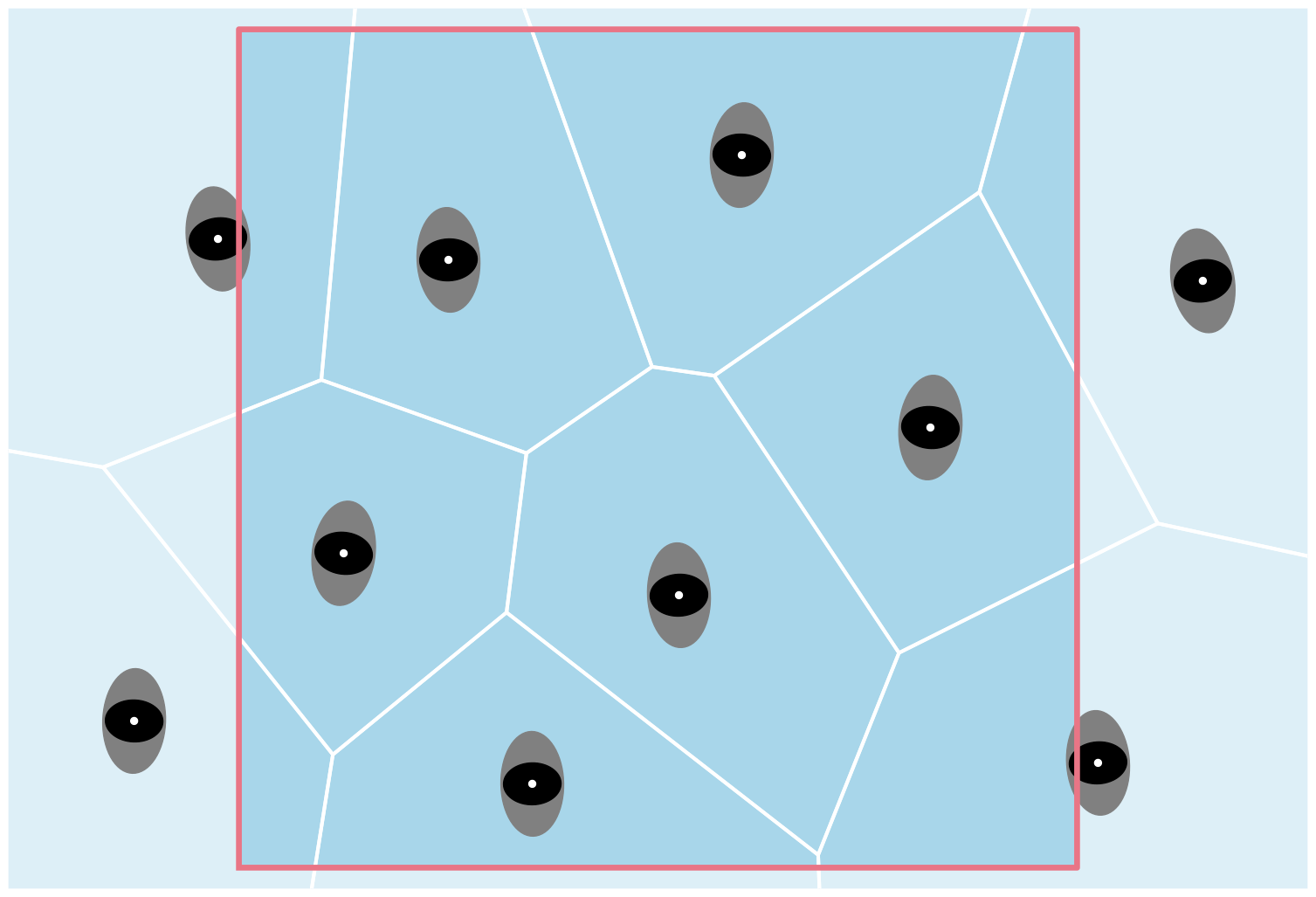
The Voronoi density \(\rho_{voronoi}(t)\) is defined as
\[\rho_{voronoi}(t) = { \int\int \rho_{xy}(t) dxdy \over A(M)},\]where \(\rho_{xy}(t) = 1 / A(V_i(t))\) is the individual density of each pedestrian, whose \(V_i(t) \cap M\) and \(A(M)\) the area of the measurement area.
- Parameters:
individual_voronoi_data (pd.DataFrame) – individual voronoi data per frame, result from
method_utils.compute_individual_voronoi_polygon()measurement_area (MeasurementArea) – area for which the density is computed
- Returns:
DataFrame containing the columns ‘frame’ and ‘density’ in \(1/m^2\), DataFrame containing the columns: ‘id’, ‘frame’, ‘polygon’ which contains the Voronoi polygon of the pedestrian, ‘density’ in \(1/m^2\) which contains the individual density of the pedestrian, ‘intersection’ which contains the intersection area of the Voronoi polygon and the given measurement area.
- Return type:
Tuple[pandas.DataFrame, pandas.DataFrame]
- compute_passing_density(*, density_per_frame, frames)#
Compute the individual density of the pedestrian who pass the area.
The passing density for each pedestrian \(\rho_{passing}(i)\) is the average number of pedestrian who are in the same measurement area \(M\) in the same time interval (\([t_{in}(i), t_{out}(i)]\)) as the pedestrian \(i\) divided by the area of that measurement area \(A(M)\). Then the computation becomes:
\[\rho_{passing}(i) = {1 \over {t_{out}(i)-t_{in}(i)}} \int^{t_{out}(i)}_{t_{in}(i)} {{N(t)} \over A(M)} dt,\]where
\(t_{in}(i) = f_{in}(i) / fps\) is the time pedestrian \(i\) crosses the first line.
\(t_{out}(i) = f_{out}(i) / fps\) when pedestrian \(i\) crosses
the second line. * \(f_{in}\) and \(f_{out}\) are the frames at which pedestrian \(i\) crosses the first and second lines, respectively. * \(fps\) is the frame rate of the trajectory data, defined by
frame_rateof the trajectory data.- Parameters:
density_per_frame (pd.DataFrame) – density per frame, result from
compute_classic_density()frames (pd.DataFrame) – information for each pedestrian in the area, result from
compute_frame_range_in_area()
- Returns:
DataFrame containing the columns ‘id’ and ‘density’ in \(1/m^2\)
- Return type:
- compute_line_density(*, individual_voronoi_polygons, measurement_line, species)#
Calculates density for both species and total density at line.
The density of each frame is accumulated from
\[\frac{1}{A_i(t)} \cdot \frac{w_i(t)}{w},\]for each pedestrian \(i\) whose Voronoi cell intersects the line.
\(A_i(t)\) is the area of the Voronoi Cell.
\(w\) is the length of the measurement line.
\(w_i(t)\) is the length of the intersecting line of the Voronoi cell in frame \(t\).
Results are computed for both species (see
compute_species())- Parameters:
individual_voronoi_polygons (pd.DataFrame) – individual Voronoi data per frame, result from
compute_individual_voronoi_polygons()measurement_line (MeasurementLine) – line at which the density is calculated
species (pd.DataFrame) – dataframe containing information about the species of every pedestrian intersecting the line, result from
compute_species()
- Returns:
Dataframe containing columns ‘frame’, ‘p_sp+1’ which contains the density in \(1/m^2\) for species +1, ‘p_sp-1’ which contains the density in \(1/m^2\) for species -1, ‘density’ which contains the density at the line in \(1/m^2\).
- Return type:
Speed#
Module containing functions to compute velocities.
- compute_individual_speed(*, traj_data, frame_step, movement_direction=None, compute_velocity=False, speed_calculation=SpeedCalculation.BORDER_EXCLUDE)#
Compute the individual speed for each pedestrian.
For computing the individuals speed at a specific frame \(v_i(t)\), a specific frame step (\(n\)) is needed. Together with the
frame_rateof the trajectory data \(fps\) the time frame \(\Delta t\) for computing the speed becomes:\[\Delta t = 2 n / fps.\]This time step describes how many frames before and after the current position \(X_{current}\) are used to compute the movement. These positions are called \(X_{future}\), \(X_{past}\) respectively.
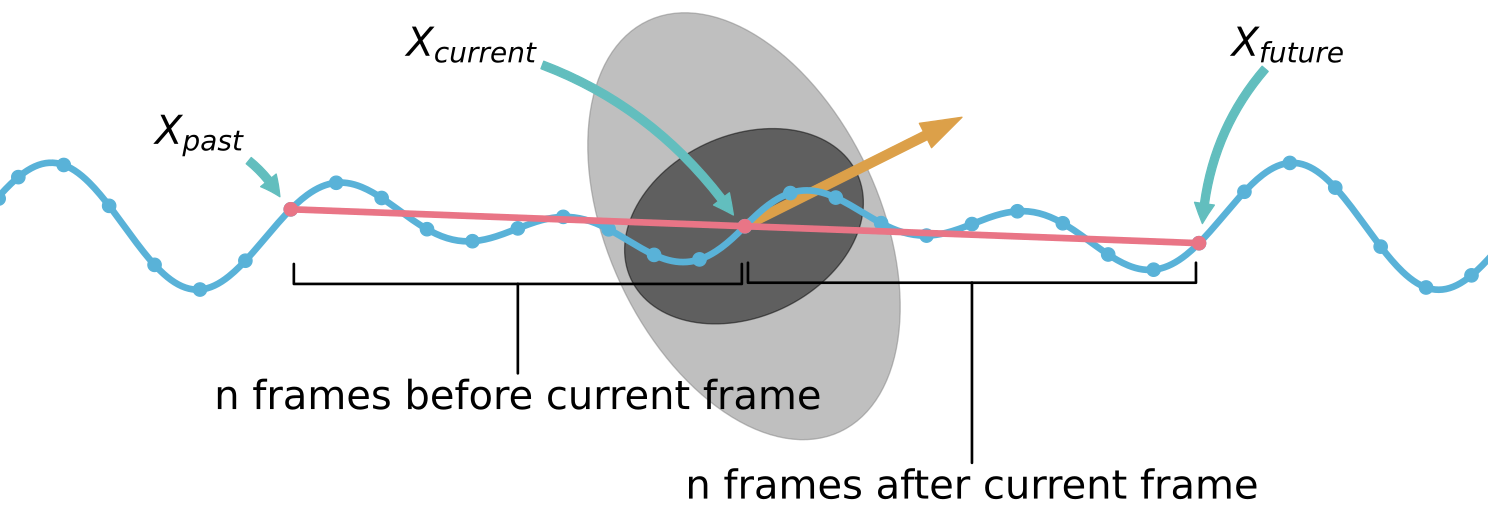
First computing the displacement between these positions \(\bar{X}\). This then can be used to compute the speed with:
\[\bar{X} = X_{future} - X_{past}.\]When getting closer to the start, or end of the trajectory data, it is not possible to use the full range of the frame interval for computing the speed. For these cases PedPy offers three different methods to compute the speed:
exclude these parts.
adaptively shrink the window in which the speed is computed.
switch to one-sided window.
Exclude border:
When not enough frames available to compute the speed at the borders, for these parts no speed can be computed and they are ignored. Use
speed_calculation=SpeedCalculation.BORDER_EXCLUDE.Adaptive border window:
In the adaptive approach, it is checked how many frames \(n\) are available to from \(X_{current}\) to the end of the trajectory. This number is then used on both sides to create a smaller symmetric window, which yields \(X_{past}\) and \(X_{future}\). Now with the same principles as before the individual speed \(v_i(t)\) can be computed.
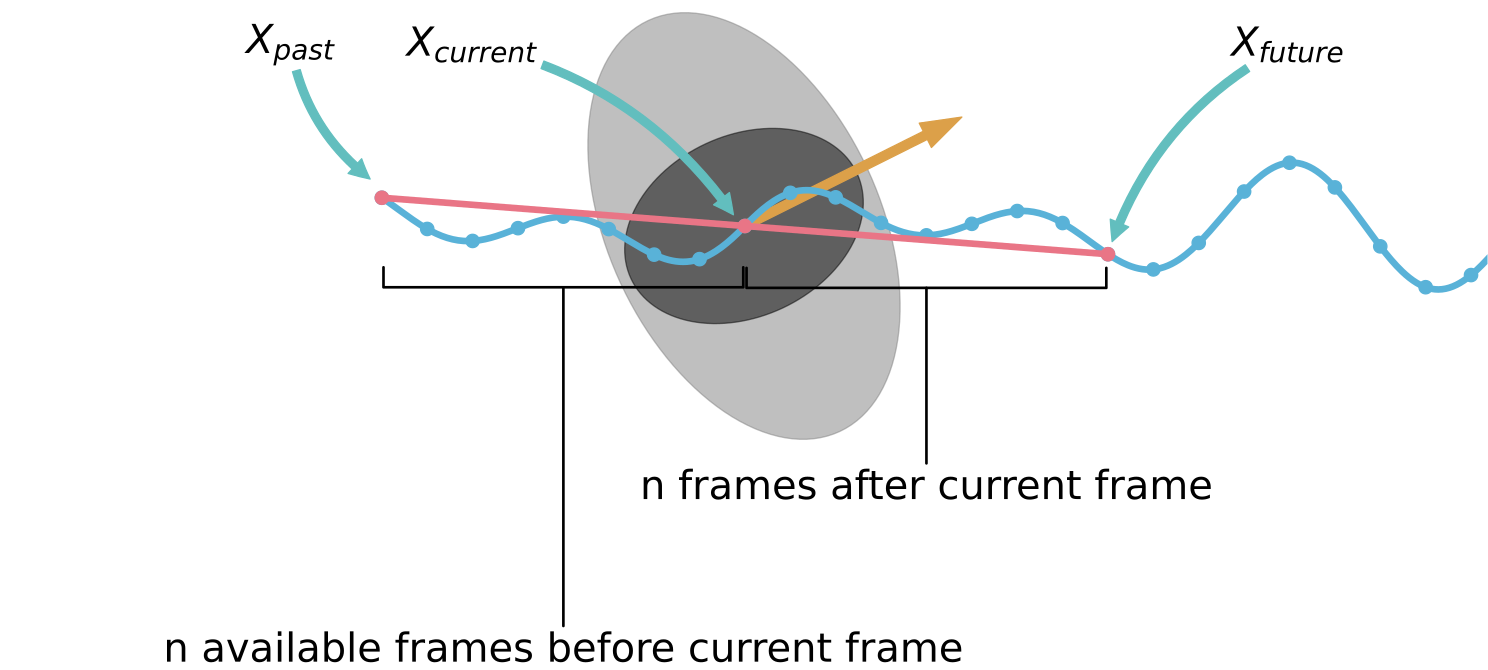
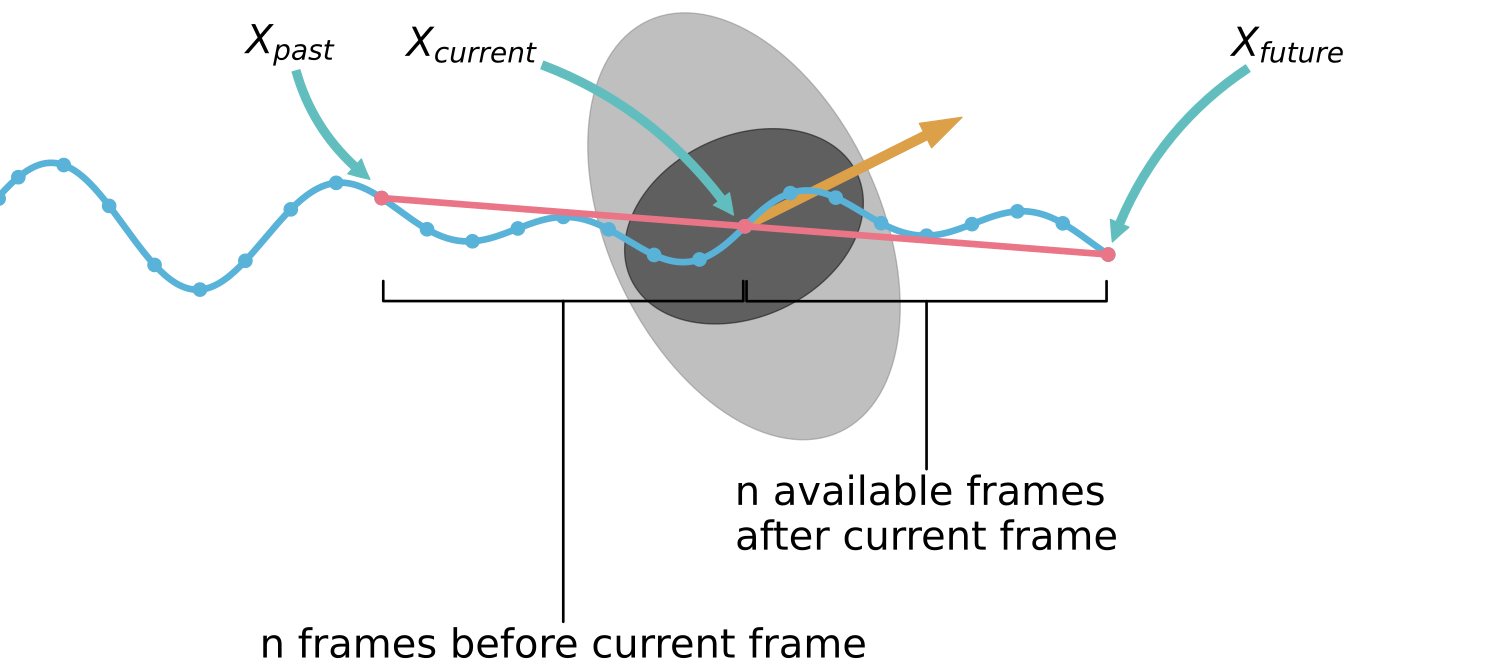
Use
speed_calculation=SpeedCalculation.BORDER_ADAPTIVE.Important
As the time interval gets smaller to the ends of the individual trajectories, the oscillations in the speed increase here.
Single sided border window:
In these cases, one of the end points to compute the movement becomes the current position \(X_{current}\). When getting too close to the start of the trajectory, the movement is computed from \(X_{current}\) to \(X_{future}\). In the other case the movement is from \(X_{past}\) to \(X_{current}\).
\[v_i(t) = {|{X_{future} - X_{current}|}\over{ \frac{1}{2} \Delta t}}, \text{, or } v_i(t) = {|{X_{current} - X_{past}|}\over{ \frac{1}{2} \Delta t}}.\]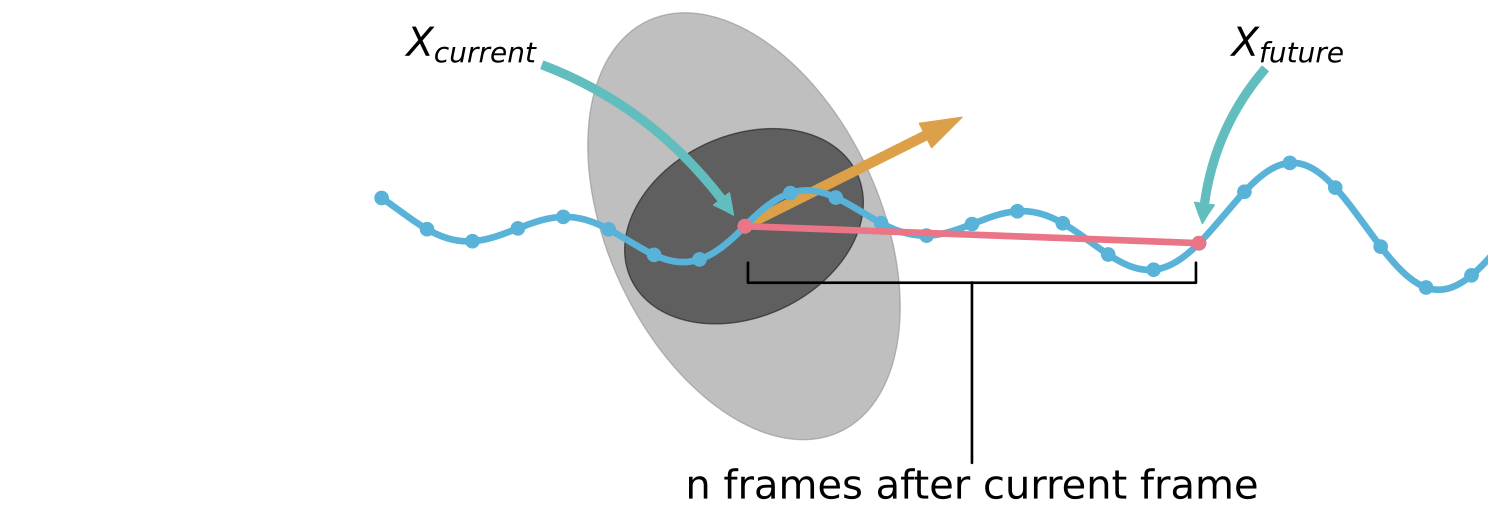
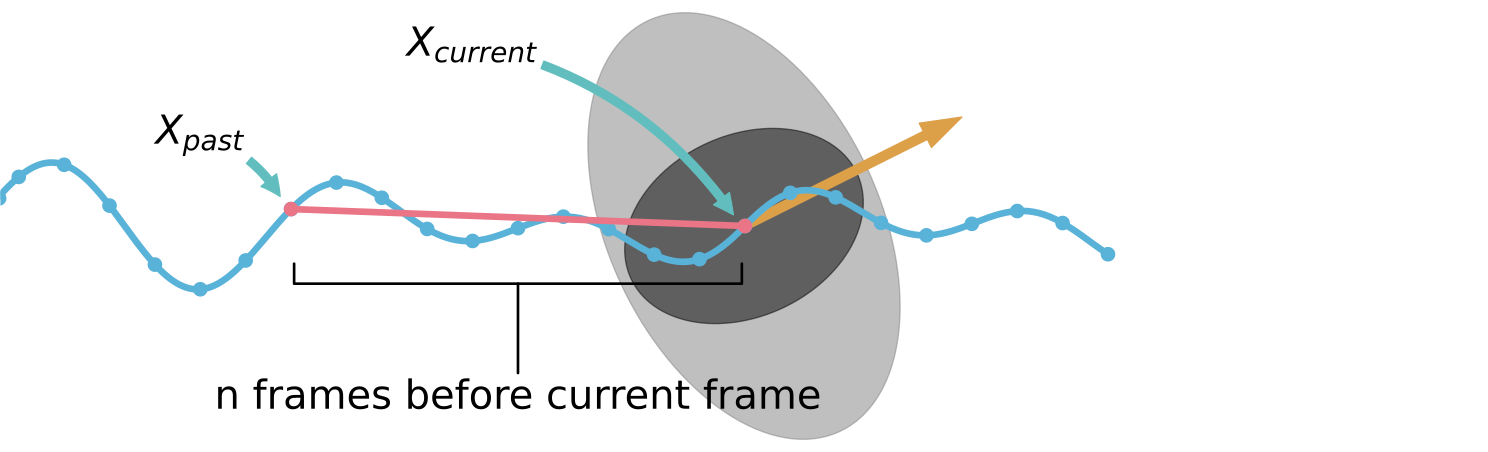
Use
speed_calculation=SpeedCalculation.BORDER_SINGLE_SIDED.Important
As at the edges of the trajectories the time interval gets halved, there may occur some jumps computed speeds at this point.
With movement direction:
It is also possible to compute the individual speed in a specific direction \(d\), for this the movement \(\bar{X}\) is projected onto the desired movement direction. \(\bar{X}\) and \(\Delta t\) are computed as described above. Hence, the speed then becomes:
\[v_i(t) = {{|\boldsymbol{proj}_d\; \bar{X}|} \over {\Delta t}}.\]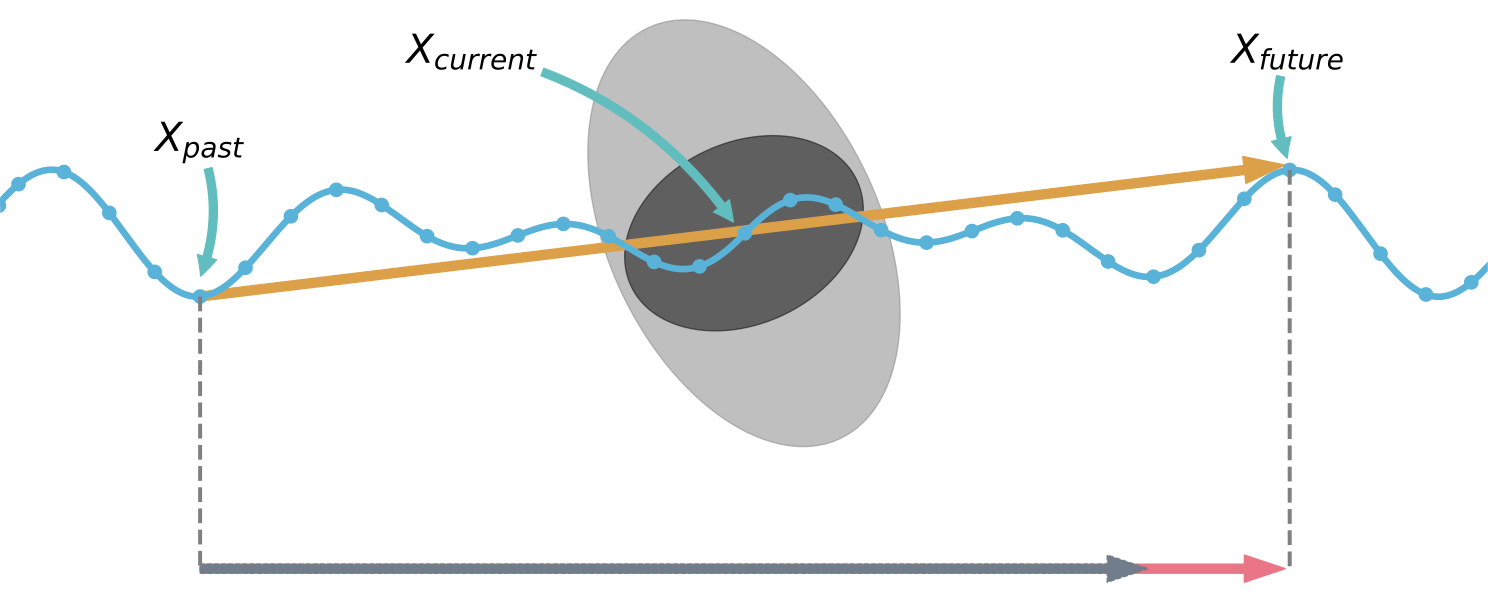
Important
Using a movement direction may lead to negative speeds!
If
compute_velocityis True also \(\bar{X}\) is returned.- Parameters:
traj_data (TrajectoryData) – trajectory data
frame_step (int) – gives the size of time interval for calculating the velocity.
movement_direction (np.ndarray) – main movement direction on which the actual movement is projected (default: None, when the un-projected movement should be used)
compute_velocity (bool) – compute the x and y components of the velocity
speed_calculation (method_utils.SpeedCalculation) – method used to compute the speed at the borders of the individual trajectories
- Returns:
DataFrame containing the columns ‘id’, ‘frame’, and ‘speed’ in m/s, ‘v_x’ and ‘v_y’ with the speed components in x and y direction if
compute_velocityis True- Return type:
- compute_mean_speed_per_frame(*, traj_data, individual_speed, measurement_area)#
Compute mean speed per frame inside a given measurement area.
Computes the mean speed \(v_{mean}(t)\) inside the measurement area from the given individual speed data \(v_i(t)\) (see
compute_individual_speed()for details of the computation). The mean speed \(v_{mean}\) is defined as\[v_{mean}(t) = {{1} \over {N}} \sum_{i \in P_M} v_i(t),\]where \(P_M\) are all pedestrians inside the measurement area, and \(N\) the number of pedestrians inside the measurement area ( \(|P_M|\)).
- Parameters:
traj_data (TrajectoryData) – trajectory data
individual_speed (pandas.DataFrame) – individual speed data from
compute_individual_speed()measurement_area (MeasurementArea) – measurement area for which the speed is computed
- Returns:
DataFrame containing the columns ‘frame’ and ‘speed’ in m/s
- Return type:
- compute_voronoi_speed(*, traj_data, individual_speed, individual_voronoi_intersection, measurement_area)#
Compute the Voronoi speed per frame inside the measurement area.
This function calculates the Voronoi speed, \(v_{voronoi}(t)\), within the measurement area \(M\). It uses the individual speed data, \(v_i(t)\) (computed via
compute_individual_speed()), and the Voronoi intersection data (obtained fromcompute_voronoi_density()).The individual speeds are weighted by the proportion of their Voronoi cell, \(V_i\), that intersects with the measurement area, \(V_i \cap M\).
The Voronoi speed, \(v_{voronoi}(t)\), is defined as:
\[v_{voronoi}(t) = \frac{\int\int v_{xy}(t) \, dx \, dy}{A(M)},\]where:
\(v_{xy}(t) = v_i(t)\) represents the individual speed of each pedestrian whose Voronoi cell intersects with the measurement area,
\(V_i(t) \cap M\) is the overlapping region between a pedestrian’s Voronoi cell and the measurement area,
and \(A(M)\) is the area of the measurement region.
- Parameters:
traj_data (TrajectoryData) – trajectory data
individual_speed (pandas.DataFrame) – individual speed data from
compute_individual_speed()individual_voronoi_intersection (pandas.DataFrame) – intersections of the individual with the measurement area of each pedestrian from
compute_intersecting_polygons()measurement_area (MeasurementArea) – area in which the voronoi speed should be computed
- Returns:
DataFrame containing the columns ‘frame’ and ‘speed’ in m/s
- Return type:
- compute_passing_speed(*, frames_in_area, frame_rate, distance)#
Compute the individual speed of the pedestrian who pass the area.
The individual speed, \(v^i_{passing}\), is calculated as the speed at which a pedestrian travels a given distance \(d\). It is defined by the formula:
\[v^i_{passing} = \frac{d}{\Delta t},\]where:
\(\Delta t = \frac{(f_{out} - f_{in})}{\text{fps}}\) is the time required for the pedestrian to cross the area.
\(f_{in}\) and \(f_{out}\) are the frames where the pedestrian crossed the first and second lines, respectively,
and \(\text{fps}\) is the frame rate of the trajectory data, given by
frame_rate.
For details on how the crossing frames (\(f_{in}\) and \(f_{out}\)) are computed, see
compute_frame_range_in_area().- Parameters:
frames_in_area (pandas.DataFrame) – information for each pedestrian when they were in the area, result from
compute_frame_range_in_area()frame_rate (float) – frame rate of the trajectory
distance (float) – distance between the two measurement lines
- Returns:
DataFrame containing the columns ‘id’ and ‘speed’ in m/s
- Return type:
- compute_line_speed(*, individual_voronoi_polygons, measurement_line, individual_speed, species)#
Calculates speed of both species and total speed orthogonal to line.
The speed of each frame is accumulated from
\[v_{i} \cdot n_{l} \cdot \frac{w_i(t)}{w},\]for each pedestrian \(i\) whose Voronoi cell intersects the line \(l\).
Here:
\(v_{i} \cdot n_{l}\) is the speed of pedestrian \(i\) orthogonal to the line \(l\).
\(w\) is the length of the measurement line.
\(w_i(t)\) is the length of the intersecting line of the Voronoi cell in frame \(t\).
Results are computed for both species (see
compute_species())- Parameters:
individual_voronoi_polygons (pandas.DataFrame) – individual Voronoi data per frame, result from
compute_individual_voronoi_polygons().measurement_line (MeasurementLine) – line at which the speed is calculated
individual_speed (pandas.DataFrame) – individual speed data per frame , result from
compute_individual_speed()usingcompute_velocityspecies (pandas.DataFrame) – dataframe containing information about the species of every pedestrian intersecting the line, result from
compute_species()
- Returns:
Dataframe containing columns ‘frame’, ‘s_sp+1’ which contains the speed in \(m/s\) for species +1, ‘s_sp-1’ which contains the speed in \(m/s\) for species -1, ‘speed’ which contains the density at the line in \(1/m^2\).
- Return type:
- compute_species(*, trajectory_data, individual_voronoi_polygons, measurement_line, frame_step)#
Creates a Dataframe containing the species for each pedestrian.
The species indicate from which side a pedestrian encounters the measurement line. The species of a pedestrian \(i\) is calculated by
\[sign(n \cdot v_i(t_{i,l})),\]where:
\(n\) the normal vector of the measurement line,
\(v_i\) is the velocity of pedestrian \(i\) at the time when their Voronoi cell intersects the measurement line \(t_{i,l}\) for the first time.
Pedestrians whose Voronoi polygons never intersect the measurement line are excluded from the resulting DataFrame.
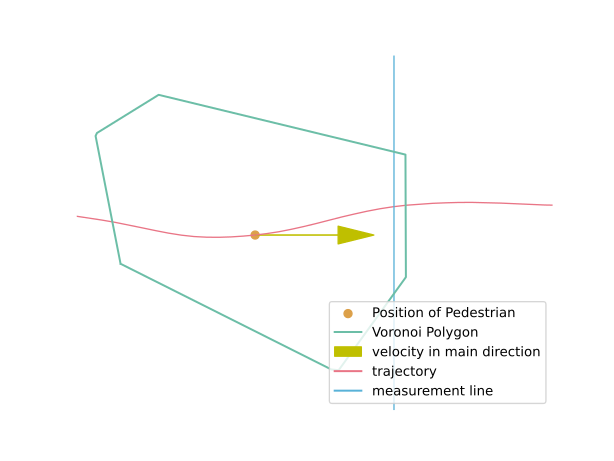
This image illustrates the frame in which the decision is made regarding the species classification of a pedestrian. The decision is based on the current velocity at the first frame where the pedestrian’s Voronoi cell intersects the measurement line.
It is important to note that the decision does not depend on whether the pedestrian actually crosses the measurement line afterward.
- Parameters:
trajectory_data (TrajectoryData) – trajectory data
individual_voronoi_polygons (pd.DataFrame) – individual Voronoi data per frame, result from
compute_individual_voronoi_polygons()measurement_line (MeasurementLine) – measurement line
frame_step (int) – gives the size of time interval for calculating the velocity.
- Returns:
Dataframe containing columns ‘id’ and ‘species’
- Return type:
Flow#
Module containing functions to compute flows.
- compute_n_t(*, traj_data, measurement_line)#
Compute the frame-wise cumulative number of pedestrians passing the line.
Records the frames, when a pedestrian crossed the given measurement line. A frame counts as crossed when the movement is across the line, but does not end on it. Then the next frame when the movement starts on the line is counted as crossing frame.
Warning
For each pedestrian only the first passing of the line is considered!
- Parameters:
traj_data (TrajectoryData) – trajectory data
measurement_line (MeasurementLine) – line for which n-t is computed
- Returns:
DataFrame containing the columns ‘frame’, ‘cumulative_pedestrians’, and ‘time’ since frame 0, and DataFrame containing the columns ‘ID’, and ‘frame’ which gives the frame the pedestrian crossed the measurement line.
- Return type:
Tuple[pandas.DataFrame, pandas.DataFrame]
- compute_flow(*, nt, crossing_frames, individual_speed, delta_frame, frame_rate)#
Compute the flow for the given the frame window from the nt information.
Computes the flow \(J\) in a frame interval of length
delta_frame(\(\Delta frame\)). The first intervals starts, when the first person crossed the measurement, given bycrossing_frames. The next interval always starts at the time when the last person in the previous frame interval crossed the line.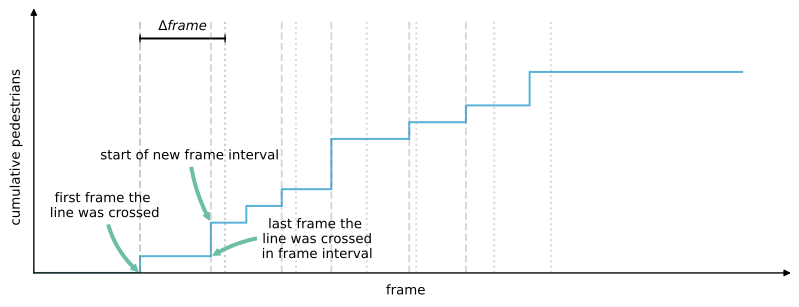
In each of the time interval it is checked, if any person has crossed the line, if yes, a flow $J$ can be computed. From the first frame the line was crossed \(f^{\Delta frame}_1\), the last frame someone crossed the line \(f^{\Delta frame}_N\) the length of the frame interval \(\Delta f$\) can be computed:
\[\Delta f = f^{\Delta frame}_N - f^{\Delta frame}_1\]This directly together with the frame rate with
frame_rate($fps$) gives the time interval $Delta t$:\[\Delta t = \Delta f / fps\]Given the number of pedestrian crossing the line is given by \(N^{\Delta frame}\), the flow \(J\) becomes:
\[J = \frac{N^{\Delta frame}}{\Delta t}\]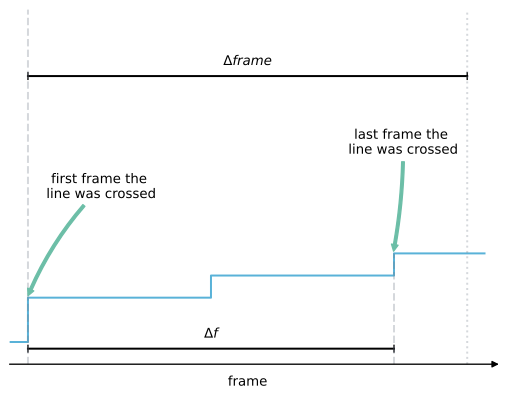
At the same time also the mean speed of the pedestrian when crossing the line is computed from
individual_speed.\[v_{crossing} = {1 \over N^{\Delta t} } \sum^{N^{\Delta t}}_{i=1} v_i(t)\]- Parameters:
nt (pd.DataFrame) – DataFrame containing the columns ‘frame’, ‘cumulative_pedestrians’, and ‘time’ (see result from
compute_n_t())crossing_frames (pd.DataFrame) – DataFrame containing the columns ‘ID’, and ‘frame’ (see result from
compute_n_t())individual_speed (pd.DataFrame) – DataFrame containing the columns ‘ID’, ‘frame’, and ‘speed’
delta_frame (int) – size of the frame interval to compute the flow
frame_rate (float) – frame rate of the trajectories
- Returns:
DataFrame containing the columns ‘flow’ in 1/s, and ‘mean_speed’ in m/s.
- Return type:
- compute_line_flow(*, individual_voronoi_polygons, measurement_line, individual_speed, species)#
Calculates flow for both species and total flow orthogonal to line.
The flow of each frame is accumulated from
\[v_{i} \cdot n_{l} \cdot \frac{1}{A_i(t)} \cdot \frac{w_i(t)}{w},\]for each pedestrian \(i\) whose Voronoi cell intersects the line.
Here:
\(v_{i} \cdot n_{l}\) is the speed of pedestrian \(i\) orthogonal to the line \(l\).
\(A_i(t)\) is the area of the Voronoi Cell.
\(w\) is the length of the measurement line.
\(w_i(t)\) is the length of the intersecting line of the Voronoi cell in frame \(t\).
Results are computed for both species (see
compute_species())- Parameters:
individual_voronoi_polygons (pd.DataFrame) – individual Voronoi data per frame, result from
compute_individual_voronoi_polygons()measurement_line (MeasurementLine) – line at which the flow is calculated
individual_speed (pd.DataFrame) – individual speed data per frame, result from
compute_individual_speed()usingcompute_velocityspecies (pd.DataFrame) – dataframe containing information about the species of every pedestrian intersecting the line, result from
compute_species()
- Returns:
Dataframe containing columns ‘frame’, ‘j_sp+1’ which contains the flow in \(1/s\) for species +1, ‘j_sp-1’ which contains the flow in \(1/s\) for species -1, ‘flow’ which contains the total flow at the line in \(1/s\).
- Return type:
Acceleration#
Module containing functions to compute accelerations.
- compute_individual_acceleration(*, traj_data, frame_step, movement_direction=None, compute_acceleration_components=False, acceleration_calculation=AccelerationCalculation.BORDER_EXCLUDE)#
Compute the individual acceleration for each pedestrian.
For computing the individuals’ acceleration at a specific frame \(a_i(t_k)\), a specific frame step (\(n\)) is needed. Together with the
frame_rateof the trajectory data \(fps\) the time frame \(\Delta t\) for computing the speed becomes:\[\Delta t = 2 n / fps\]This time step describes how many frames before and after the current position \(X(t_k)\) are used to compute the movement. These positions are called \(X(t_{k+n})\), \(X(t_{k-n})\) respectively.
In order to compute the acceleration at time ‘t_k’, we first calculate the displacements \(\bar{X}\) around ‘t_{k+n}’ and ‘t_{k-n}’:
\[\bar{X}(t_{k+n}) = X(t_{k+2n}) - X(t_{k})\]\[\bar{X}(t_{k-n}) = X(t_{k}) - X(t_{k-2n})\]The acceleration is then calculated from the difference of the displacements
\[\Delta\bar{X}(t_k) = \bar{X}(t_{k+n}) - \bar{X}(t_{k-n})\]divided by the square of the time interval ‘Delta t’:
\[a_i(t_k) = \Delta\bar{X}(t_k) / \Delta t^{2}\]When getting closer to the start, or end of the trajectory data, it is not possible to use the full range of the frame interval for computing the acceleration. For these cases PedPy offers a method to compute the acceleration:
Exclude border:
When not enough frames available to compute the speed at the borders, for these parts no acceleration can be computed and they are ignored. Use
acceleration_calculation=AccelerationCalculation.BORDER_EXCLUDE.With movement direction:
It is also possible to compute the individual acceleration in a specific direction \(d\), for this the movement \(\Delta\bar{X}\) is projected onto the desired movement direction. \(\Delta\bar{X}\) and \(\Delta t\) are computed as described above. Hence, the acceleration then becomes:
\[a_i(t) = {{|\boldsymbol{proj}_d\; \Delta\bar{X}|} \over {\Delta t^{2}}}\]If
compute_acceleration_componentsis True also \(\Delta\bar{X}\) is returned.- Parameters:
traj_data (TrajectoryData) – trajectory data
frame_step (int) – gives the size of time interval for calculating the acceleration.
movement_direction (np.ndarray) – main movement direction on which the actual movement is projected (default: None, when the un-projected movement should be used)
compute_acceleration_components (bool) – compute the x and y components of the acceleration
acceleration_calculation (method_utils.AccelerationCalculation) – method used to compute the acceleration at the borders of the individual trajectories
- Returns:
DataFrame containing the columns ‘id’, ‘frame’, and ‘acceleration’ in \(m/s^2\), ‘a_x’ and ‘a_y’ with the acceleration components in x and y direction if
compute_acceleration_componentsis True- Return type:
- compute_mean_acceleration_per_frame(*, traj_data, individual_acceleration, measurement_area)#
Compute mean acceleration per frame inside a given measurement area.
Computes the mean acceleration \(a_{mean}(t)\) inside the measurement area from the given individual acceleration data \(a_i(t)\) (see
compute_individual_acceleration()for details of the computation). The mean acceleration \(a_{mean}\) is defined as\[a_{mean}(t) = {{1} \over {N}} \sum_{i \in P_M} a_i(t),\]where \(P_M\) are all pedestrians inside the measurement area, and \(N\) the number of pedestrians inside the measurement area ( \(|P_M|\)).
- Parameters:
traj_data (TrajectoryData) – trajectory data
individual_acceleration (pandas.DataFrame) – individual acceleration data from
compute_individual_acceleration()measurement_area (MeasurementArea) – measurement area for which the acceleration is computed
- Returns:
DataFrame containing the columns ‘frame’ and ‘acceleration’ in \(m/s^2\)
- Return type:
- compute_voronoi_acceleration(*, traj_data, individual_acceleration, individual_voronoi_intersection, measurement_area)#
Computes the Voronoi acceleration.
Computes the Voronoi acceleration \(a_{voronoi}(t)\) inside the measurement area \(M\) from the given individual acceleration data \(a_i(t)\) (see
compute_individual_acceleration()for details of the computation) and their individual Voronoi intersection data (fromcompute_voronoi_density()). The individuals’ accelerations are weighted by the proportion of their Voronoi cell \(V_i\) and the intersection with the measurement area \(V_i \cap M\).The Voronoi acceleration \(a_{voronoi}(t)\) is defined as
\[a_{voronoi}(t) = { \int\int a_{xy}(t) dxdy \over A(M)},\]where \(a_{xy}(t) = a_i(t)\) is the individual acceleration of each pedestrian, whose \(V_i(t) \cap M\) and \(A(M)\) the area of the measurement area.
- Parameters:
traj_data (TrajectoryData) – trajectory data
individual_acceleration (pandas.DataFrame) – individual acceleration data from
compute_individual_acceleration()individual_voronoi_intersection (pandas.DataFrame) – intersections of the individual with the measurement area of each pedestrian from
compute_intersecting_polygons()measurement_area (MeasurementArea) – area in which the voronoi acceleration should be computed
- Returns:
DataFrame containing the columns ‘frame’ and ‘acceleration’ in \(m/s^2\)
- Return type:
Further measurements#
Spatial Analysis#
Module containing functions to compute spatial analysis methods.
For example: the pair distribution function.
- compute_pair_distribution_function(*, traj_data, radius_bin_size, randomisation_stacking=1)#
Computes the pair distribution function g(r).
This function calculates the spatial distribution of positions \(g(r)\) \(g(r)\) here referred to the Euclidean distance between interacting pedestrians, i.e., pedestrians that are in the same walkable area at the same moment. The pdf is given by the probability that two pedestrians are separated by \(r\) normalized by the probability \(PNI(r)\) that two non-interacting pedestrians are separated by \(r\), specifically
\[g(r) = P(r)/PNI(r),\]- Parameters:
traj_data (pedpy.data.trajectory_data.TrajectoryData) – TrajectoryData, an object containing the trajectories.
radius_bin_size (float) – float, the size of the bins for the radial distribution function in the same units as the positions.
randomisation_stacking (int) – int, Number of time the dataset will be stacked before being randomly shuffled to exact distances of non-interacting pedestrians. Larger stacking number will lead to closer approximation of true pairwise distribution of non- interacting pedestrians but with also increase computation cost.
- Returns:
A tuple of two numpy arrays. The first array contains the bin edges (excluding the first bin edge), and the second array contains the values of the pair-distribution function \(g(r)\) for each bin.
- Return type:
Tuple[numpy.typing.NDArray[numpy.float16], numpy.typing.NDArray[numpy.float16]]
Motion profiles#
Module containing functions to compute profiles.
For the computation of the profiles the given WalkableArea
is divided into square grid cells.
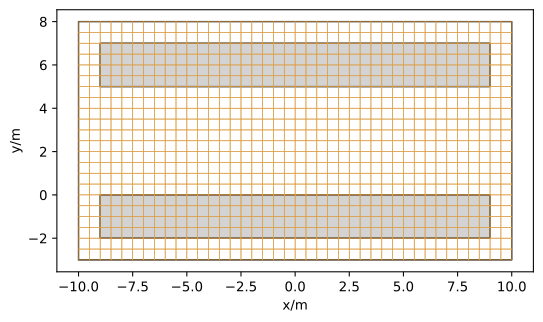
Each of these grid cells is then used as a
AxisAlignedMeasurementArea in which the mean speed and
density can be computed with different methods.
- class SpeedMethod(*args, **kwds)#
Method used to compute the speed profile.
- ARITHMETIC#
Compute arithmetic Voronoi speed profile.
In each cell \(M\) the arithmetic Voronoi speed \(v_{arithmetic}\) is defined as
\[v_{arithmetic} = \frac{1}{N} \sum_{i \in P_M} v_i,\]where \(P_M\) are the pedestrians, whose Voronoi cell \(V_i\) intersects with the grid cell \(M\) (\(V_i \cap M\)). Then \(N\) is the number of pedestrians in \(P_M\) (\(|P_M|\)).
- VORONOI#
Compute Voronoi speed profile.
In each cell \(M\) the Voronoi speed \(v_{voronoi}\) is defined as
\[v_{voronoi} = { \int\int v_{xy} dxdy \over A(M)},\]where \(v_{xy} = v_i\) is the individual speed of each pedestrian, whose \(V_i \cap M\) and \(A(M)\) the area the grid cell.
- MEAN#
Compute mean speed profile.
In each cell \(M\) the mean speed \(v_{mean}\) is defined as
\[v_{mean} = \frac{1}{N} \sum_{i \in P_M} v_i,\]where \(P_M\) are the pedestrians inside the grid cell. Then \(N\) is the number of pedestrians inside \(P_M\) (\(|P_M|\)).
- GAUSSIAN#
Compute Gaussian speed profile.
In each cell the weighted speed \(v_{c}\) is calculated as
\[v_{c} = \frac{\sum_{i=1}^{N}{\big(w_i\cdot v_i\big)}} {\sum_{i=1}^{N} w_i},\]where \(v_i\) is the speed of a pedestrian and \(w_i\) are weights depending on the pedestrian’s distance \(\delta\) from its position (\(\boldsymbol{r}_i\)) to the center of the grid (\(\boldsymbol{c}\)) cell:
\[\delta = \boldsymbol{r}_i - \boldsymbol{c}.\]The weights \(w_i\) are calculated by a Gaussian as follows:
\[w_i = \frac{1} {\sigma \cdot \sqrt{2\pi}} \exp\big(-\frac{\delta^2}{2\sigma^2}\big),\]where \(\sigma\) is derived from FWHM as:
\[\sigma = \frac{FWHM}{2\sqrt{2\ln(2)}}.\]
- class DensityMethod(*args, **kwds)#
Method used to compute the density profile.
- VORONOI#
Voronoi density profile.
In each cell the density \(\rho_{voronoi}\) is defined by
\[\rho_{voronoi} = { \int\int \rho_{xy} dxdy \over A(M)},\]where \(\rho_{xy} = 1 / A(V_i)\) is the individual density of each pedestrian, with the individual Voronoi polygons \(V_i\) where \(V_i \cap M\) and \(A(M)\) the area of the grid cell.
- CLASSIC#
Classic density profile.
In each cell the density \(\rho_{classic}\) is defined by
\[\rho_{classic} = {N \over A(M)},\]where \(N\) is the number of pedestrians inside the grid cell \(M\) and the area of that grid cell (\(A(M)\)).
- GAUSSIAN#
Gaussian density profile.
In each cell the density \(\rho_{gaussian}\) is defined by
\[\rho_{gaussian} = \sum_{i=1}^{N}{\delta (\boldsymbol{r}_i - \boldsymbol{c})},\]where \(\boldsymbol{r}_i\) is the position of a pedestrian and \(\boldsymbol{c}\) is the center of the grid cell. Finally \(\delta(x)\) is approximated by a Gaussian
\[\delta(x) = \frac{1}{\sigma\sqrt{2\pi}}\exp[-x^2/2\sigma^2],\]where \(\sigma\) is the standard deviation.
- compute_profiles(*, data=None, walkable_area=None, grid_size, speed_method, density_method=DensityMethod.VORONOI, gaussian_width=None, axis_aligned_measurement_area=None, **kwargs)#
Computes the density and speed profiles.
Note
As this is a quite compute heavy operation, it is suggested to reduce the geometry to the important areas and limit the
datato the most relevant frame interval.- Parameters:
data (pandas.DataFrame) – Data from which the profiles are computes. The DataFrame must contain a frame and a speed (result from
compute_individual_speed()) column. For computing density profiles, it must contain a polygon column (fromcompute_individual_voronoi_polygons()) when using the DensityMethod.VORONOI. When computing the classic density profile (DensityMethod.CLASSIC) the DataFrame needs to contain the columns ‘x’ and ‘y’. Computing the speed profiles needs a polygon column (fromcompute_individual_voronoi_polygons()) when using theSpeedMethod.VORONOIorSpeedMethod.ARITHMETIC. For getting a DataFrame containing all the needed data, you can merge the results of the different function on the ‘id’ and ‘frame’ columns (seepandas.DataFrame.merge()andpandas.merge()).walkable_area (WalkableArea) – geometry for which the profiles are computed
grid_size (float) – resolution of the grid used for computing the profiles
speed_method (SpeedMethod) – speed method used to compute the speed profile
density_method (DensityMethod) – density method to compute the density profile (default:
DensityMethod.VORONOI)gaussian_width (Optional[float]) – full width at half maximum for Gaussian approximation. Used when
DensityMethod.GAUSSIANorSpeedMethod.GAUSSIANis selected.axis_aligned_measurement_area (AxisAlignedMeasurementArea) – Measurement area for which the profiles are computed.
individual_voronoi_speed_data – deprecated alias for
data. Please usedatain the future.kwargs (Any)
- Returns:
List of density profiles, List of speed profiles
- Return type:
Tuple[Sequence[numpy.typing.NDArray[numpy.float64]], Sequence[numpy.typing.NDArray[numpy.float64]]]
- compute_density_profile(*, data, walkable_area=None, grid_size, density_method, grid_intersections_area=None, gaussian_width=None, axis_aligned_measurement_area=None)#
Compute the density profile.
- Parameters:
data (pandas.DataFrame) – Data from which the profiles are computes. The DataFrame must contain a frame column. It must contain a polygon column (from
compute_individual_voronoi_polygons()) when using theDensityMethod.VORONOI. When computing the classic density profile (DensityMethod.CLASSIC) or Gaussian density profile (DensityMethod.GAUSSIAN) the DataFrame needs to contain the columns ‘x’ and ‘y’. For getting a DataFrame containing all the needed data, you can merge the results of the different function on the ‘id’ and ‘frame’ columns (seepandas.DataFrame.merge()andpandas.merge()).walkable_area (WalkableArea) – geometry for which the profiles are computed
axis_aligned_measurement_area (AxisAlignedMeasurementArea) – Measurement area for which the profiles are computed.
grid_size (float) – resolution of the grid used for computing the profiles
density_method (DensityMethod) – density method to compute the density profile
grid_intersections_area (Optional[numpy.typing.NDArray[numpy.float64]]) – (Optional) intersection of grid cells with the Voronoi polygons (result from
compute_grid_cell_polygon_intersection_area()). If not provided when usingDensityMethod.VORONOI, the intersections are computed on-the-fly per frame, which avoids allocating the full (num_grid_cells x num_rows) matrix at the cost of recomputing the per-frame intersection.gaussian_width (Optional[float]) – full width at half maximum for Gaussian approximation of the density, only needed when using
DensityMethod.GAUSSIAN.
- Returns:
List of density profiles
- Return type:
Sequence[numpy.typing.NDArray[numpy.float64]]
- compute_speed_profile(*, data, walkable_area=None, grid_size, speed_method, grid_intersections_area=None, fill_value=np.nan, gaussian_width=0.5, axis_aligned_measurement_area=None)#
Computes the speed profile for pedestrians within an area.
This function calculates speed profiles based on pedestrian speed data across a grid within a walkable area. The method of computation can be selected among several options, including mean (
SpeedMethod.MEAN), Gaussian (SpeedMethod.GAUSSIAN), Voronoi (SpeedMethod.VORONOI), and arithmetic mean methods (SpeedMethod.ARITHMETIC), each suitable for different analysis contexts.- Parameters:
data (pandas.DataFrame) – A pandas DataFrame containing frame and pedestrian speed (result from
compute_individual_speed()). Depending on speed_method, additional columns x, y, or polygon might be required. polygon column (fromcompute_individual_voronoi_polygons()) is required when using theSpeedMethod.VORONOIorSpeedMethod.ARITHMETIC. When computing the Gaussian profile (SpeedMethod.GAUSSIAN) the DataFrame needs to contain the columns x and y. For getting a DataFrame containing all the needed data, you can merge the results of the different function on the id and frame columns (seepandas.DataFrame.merge()andpandas.merge()).walkable_area (WalkableArea) – geometry for which the speed profiles are computed.
axis_aligned_measurement_area (AxisAlignedMeasurementArea) – Measurement area for which the profiles are computed.
grid_size (float) – The resolution of the grid used for computing the profiles, expressed in the same units as the walkable_area.
speed_method (SpeedMethod) – The speed method used to compute the speed profile
grid_intersections_area (Optional[numpy.typing.NDArray[numpy.float64]]) – (Optional) intersection areas of grid cells with Voronoi polygons (result from
compute_grid_cell_polygon_intersection_area()). If not provided when usingSpeedMethod.VORONOIorSpeedMethod.ARITHMETIC, the intersections are computed on-the-fly per frame.fill_value (float) – fill value for cells with no pedestrians inside when using
SpeedMethod.MEAN(default = np.nan)gaussian_width (Optional[float]) – (Optional) The full width at half maximum (FWHM) for Gaussian weights, required when using
SpeedMethod.GAUSSIAN(default = 0.5).
- Returns:
A list of NumPy arrays, each representing the speed profile per frame.
- Return type:
Sequence[numpy.typing.NDArray[numpy.float64]]
Note
The choice of speed_method significantly impacts the required data format and the interpretation of results. Refer to the documentation of
SpeedMethodfor details on each method’s requirements and use cases.
- compute_grid_cell_polygon_intersection_area(*, data, grid_cells)#
Computes the intersection area of the grid with the Voronoi polygons.
Note
As this is a quite compute heavy operation, it is suggested to reduce limit the
datato the most relevant frame interval.Note
If computing the speed/density profiles multiple times, e.g., with different methods it is of advantage to compute the grid cell polygon intersections before and then pass the result to the other functions.
Important
When passing the grid cell-polygon intersection, make sure to also pass the returned DataFrame as data, as it has the same ordering of rows as used for the grid cell-polygon intersection. Changing the order afterward will return wrong results!
- Parameters:
data (pandas.DataFrame) – DataFrame containing at least the columns ‘frame’ and ‘polygon’ (which should hold the result from
compute_individual_voronoi_polygons())grid_cells (numpy.typing.NDArray[shapely.Polygon]) – Grid cells used for computing the profiles, e.g., result from
get_grid_cells()
- Returns:
Tuple containing first the grid cell-polygon intersection areas, and second the reordered data by ‘frame’, which needs to be used in the next steps.
- Return type:
Tuple[numpy.typing.NDArray[numpy.float64], pandas.DataFrame]
- get_grid_cells(*, walkable_area=None, axis_aligned_measurement_area=None, grid_size)#
Creates a list of square grid cells covering the given geometry.
The grid cells are created in a way that they cover either the whole walkable area or axis-aligned measurement area. The cells are created starting from the top left corner of the geometry and are aligned with the x and y axes. The grid cells are squares with the given size.
If you create the for a
WalkableAreathe resulting grid will look like this:
If you create the for a
AxisAlignedMeasurementAreathe resulting grid will look like this: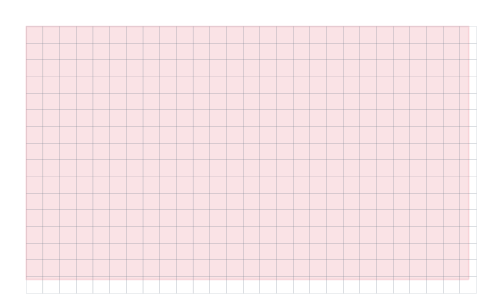
- Parameters:
walkable_area (WalkableArea) – geometry for which the profiles are computed.
grid_size (float) – resolution of the grid used for computing the profiles.
axis_aligned_measurement_area (AxisAlignedMeasurementArea) – Measurement area for which the profiles are computed.
- Returns:
(List of grid cells, number of grid rows, number of grid columns)
- Return type:
Tuple[numpy.typing.NDArray[shapely.Polygon], int, int]
- class RsetMethod(*args, **kwds)#
Aggregation method for computing RSET maps.
RSET (Required Safe Egress Time) maps show the time at which pedestrians occupy each spatial cell. Different aggregation methods provide different perspectives on the evacuation process.
See: Schröder et al., “A Map Representation of the ASET-RSET Concept” (Fire Safety Journal, 2020).
- MAX#
Maximum time a pedestrian was observed in each cell.
This gives the last time any pedestrian occupied each cell, representing the required safe egress time (RSET) per cell.
- MIN#
Minimum time a pedestrian was observed in each cell.
This gives the earliest time any pedestrian was observed in each cell.
- MEAN#
Mean time pedestrians were observed in each cell.
- compute_rset_map(*, traj_data, walkable_area=None, axis_aligned_measurement_area=None, grid_size, method=RsetMethod.MAX)#
Compute an RSET (Required Safe Egress Time) map.
The walkable area (or measurement area) is divided into a grid of square cells. For each cell, the time values of all trajectory points falling inside the cell are aggregated using method (default: maximum). This yields a 2-D array where each entry represents the aggregated time in that cell.
The implementation follows Section 5.5.1 of Schröder et al., “A Map Representation of the ASET-RSET Concept” (Fire Safety Journal, 2020).
- Parameters:
traj_data (pedpy.data.trajectory_data.TrajectoryData) – Trajectory data to analyse.
walkable_area (Optional[pedpy.data.geometry.WalkableArea]) – Geometry over which to compute the map.
axis_aligned_measurement_area (Optional[pedpy.data.geometry.AxisAlignedMeasurementArea]) – Alternative rectangular area.
grid_size (float) – Side length of each grid cell (in metres).
method (RsetMethod) – Aggregation method applied to the time values per cell (default:
RsetMethod.MAX).
- Returns:
A 2-D NumPy array (rows x cols) with the aggregated time per cell. Cells with no observations contain NaN.
- Return type:
numpy.typing.NDArray[numpy.float64]
Utilities#
Helper functions for the analysis methods.
- LambdaGroupFunction: TypeAlias = Callable[[pd.DataFrame, MeasurementLine], pd.DataFrame]#
- class SpeedCalculation(*args, **kwds)#
Method-identifier used to compute the movement at traj borders.
- BORDER_EXCLUDE#
- BORDER_ADAPTIVE#
- BORDER_SINGLE_SIDED#
- class AccelerationCalculation(*args, **kwds)#
Method-identifier used to compute the movement at traj borders.
- BORDER_EXCLUDE#
- class DataValidationStatus(*args, **kwds)#
Identifies the result of a return value.
- DATA_CORRECT#
- COLUMN_MISSING#
- ENTRY_MISSING#
- class Cutoff#
Maximal extend of a Voronoi polygon.
The maximal extend is an approximated circle with the given radius and number of line segments used to approximate a quarter circle.
- is_trajectory_valid(*, traj_data, walkable_area)#
Checks if all trajectory data points lie within the given walkable area.
- Parameters:
traj_data (TrajectoryData) – trajectory data
walkable_area (WalkableArea) – walkable area in which the pedestrians should be
- Returns:
All points lie within walkable area
- Return type:
- get_invalid_trajectory(*, traj_data, walkable_area)#
Returns all trajectory data points outside the given walkable area.
- Parameters:
traj_data (TrajectoryData) – trajectory data
walkable_area (WalkableArea) – walkable area in which the pedestrians should be
- Returns:
DataFrame showing all data points outside the given walkable area
- Return type:
- compute_frame_range_in_area(*, traj_data, measurement_line, width)#
Compute the frame ranges for each pedestrian inside the measurement area.
The measurement area is virtually created by creating a second measurement line parallel to the given one offsetting by the given width. The area between these line is the used measurement area.
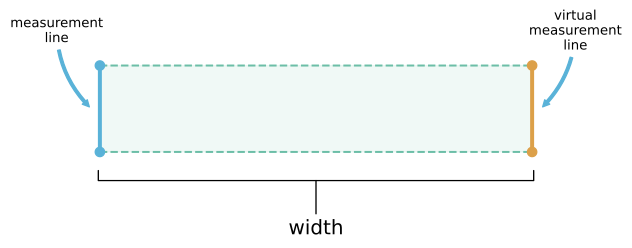
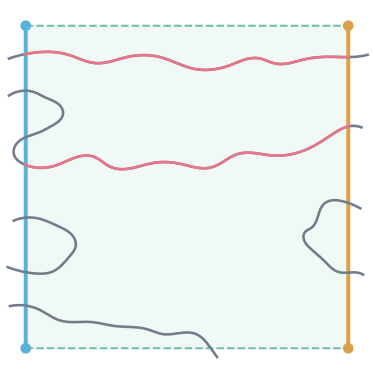
For each pedestrians now the frames when they enter and leave the virtual measurement area is computed. In this frame interval they have to be inside the measurement area continuously. They also need to enter and leave the measurement area via different measurement lines. If leaving the area between the two lines, crossing the same line twice they will be ignored. For a better understanding, see the image below, where red parts of the trajectories are the detected ones inside the area. These frame intervals will be returned.
Note
As passing we define the frame, the pedestrians enter the area and then move through the complete area without leaving it. Hence, doing a closed analysis of the movement area with several measuring ranges underestimates the actual movement time.
- Parameters:
traj_data (TrajectoryData) – trajectory data
measurement_line (MeasurementLine) – measurement line
width (float) – distance to the second measurement line
- Returns:
DataFrame containing the columns ‘id’, ‘entering_frame’ describing the frame the pedestrian crossed the first or second line, ‘leaving_frame’ describing the frame the pedestrian crossed the second or first line, and the created measurement area
- Return type:
Tuple[pandas.DataFrame, MeasurementArea]
- compute_neighbors(individual_voronoi_data, as_list=True)#
Compute the neighbors of each pedestrian based on the Voronoi cells.
Computation of the neighborhood of each pedestrian per frame. Every other pedestrian is a neighbor if the Voronoi cells of both pedestrian touch and some point. The threshold for touching is set to 1mm.
Important
For legacy reasons the function
compute_neighbors()works also without specifingas_list(defaults toTrue). We highly discourage using this, as its result is harder to be used in further computations. Use ‘as_list=False’ instead. The default value may change in future versions of PedPy.- Parameters:
individual_voronoi_data (pandas.DataFrame) – individual voronoi data, needs to contain a column ‘polygon’, which holds a
shapely.Polygon(result fromcompute_individual_voronoi_polygons())as_list (bool) – Return the neighbors as a list per pedestrian and frame, if
True, otherwise each neighbor is in a single row.
- Returns:
DataFrame containing the columns ‘id’, ‘frame’ and ‘neighbors’, where neighbors are a list of the neighbor’s IDs if as_list is
True. Otherwise the DataFrame contains the columns ‘id’, ‘frame’, ‘neighbor_id’.- Return type:
- compute_neighbor_distance(*, traj_data, neighborhood)#
Compute the distance between the neighbors.
Computes the distance between the position of neighbors. As neighbors the result of
compute_neighbors()with parameteras_list=False.Note
The resulting
DataFrameis symmetric. If pedestrian A is a neighbor of pedestrian B, then pedestrian B is also a neighbor of pedestrian A. Consequently, the distance between both appears twice in theDataFrame.- Parameters:
traj_data (TrajectoryData) – trajectory data
neighborhood (pd.DataFrame) – DataFrame containing the columns ‘id’, ‘frame’ and ‘neighbor_id’. The result of
compute_neighbors()with parameteras_list=Falsecan be used here as input.
- Raises:
PedPyValueError – When passing a result of
compute_neighbors()with parameteras_list=True.- Returns:
DataFrame containing the columns ‘id’, ‘frame’, ‘neighbor_id’ and ‘distance’.
- Return type:
- compute_time_distance_line(*, traj_data, measurement_line)#
Compute the time and distance to the measurement line.
Compute the time (in frames) and distance to the first crossing of the measurement line for each pedestrian. For further information how the crossing frames are computed see
compute_crossing_frames(). All frames after a pedestrian has crossed the line will be omitted in the results.- Parameters:
traj_data (TrajectoryData) – trajectory data
measurement_line (MeasurementLine) – line which is crossed
- Returns:
DataFrame containing ‘id’, ‘frame’, ‘distance’ (meters to measurement line), and ‘time’ (seconds until crossing)
- Return type:
- compute_individual_voronoi_polygons(*, traj_data, walkable_area, cut_off=None, use_blind_points=None)#
Compute the individual Voronoi polygon for each person and frame.
The Voronoi cell will be computed based on the Voronoi tesselation of the pedestrians position. The resulting polygons will then be intersected with the walkable area.
Warning
In case of non-convex walkable areas it might happen that Voronoi cell will be cut at unexpected places.
The computed Voronoi cells will stretch all the way to the boundaries of the walkable area. As seen below:
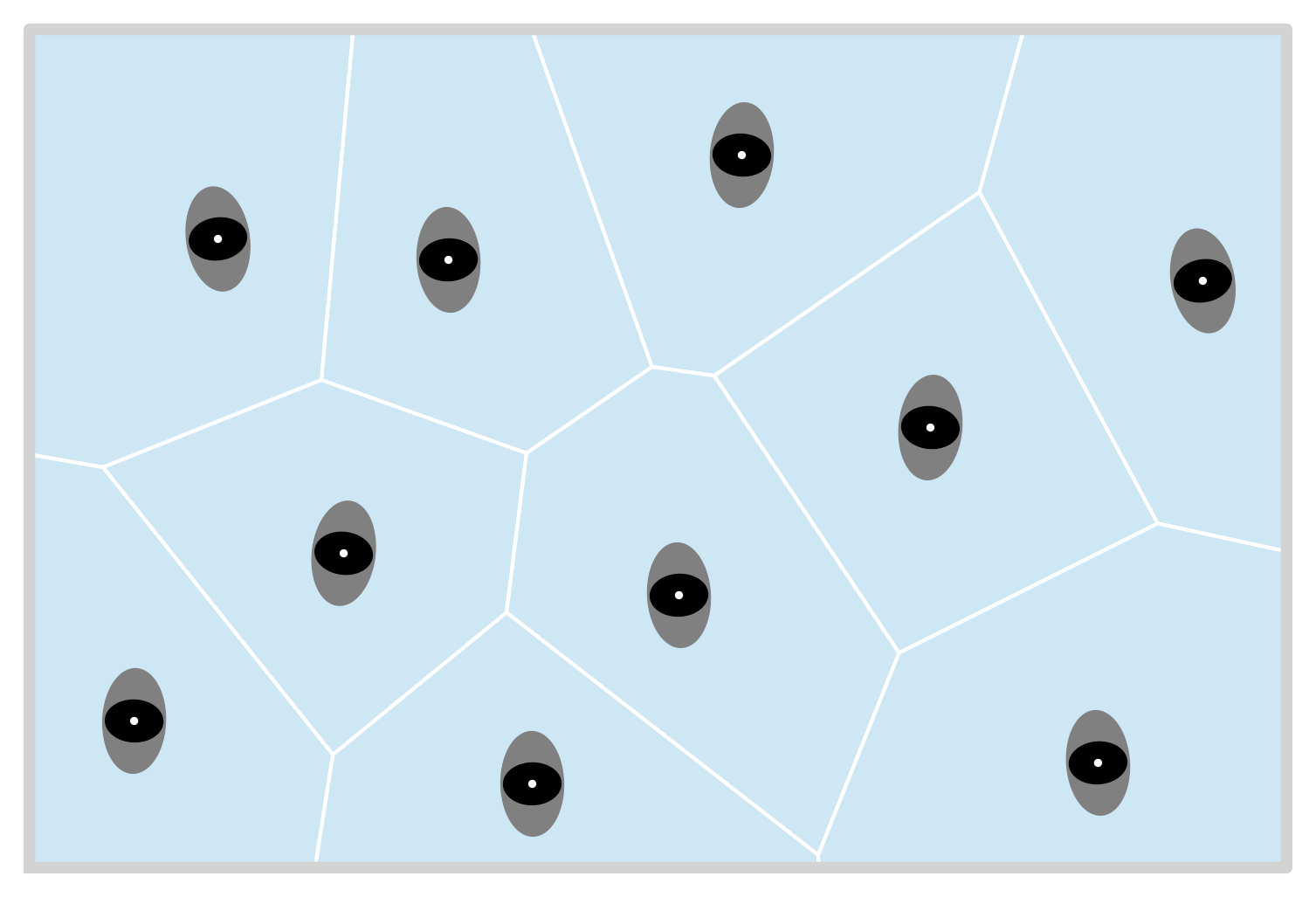
In cases with only a few pedestrians not close to each other or large walkable areas this might not be desired behavior as the size of the Voronoi polygon is directly related to the individual density. In this case the size of the Voronoi polygon can be restricted by a
Cutoff, where you give a radius and the number of line segments used to approximate a quarter circle. The differences the number of line segments has on the circle can be seen in the plot below: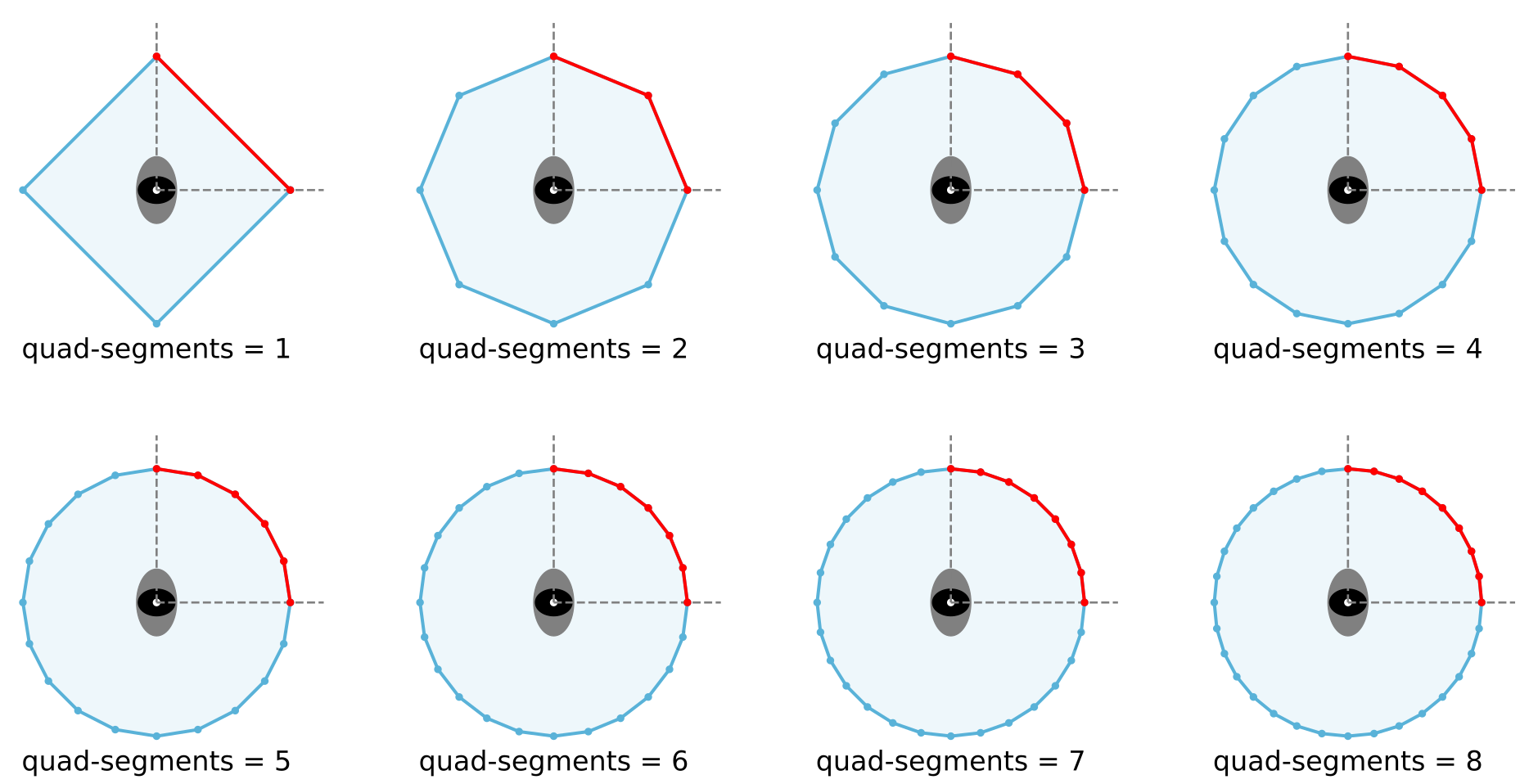
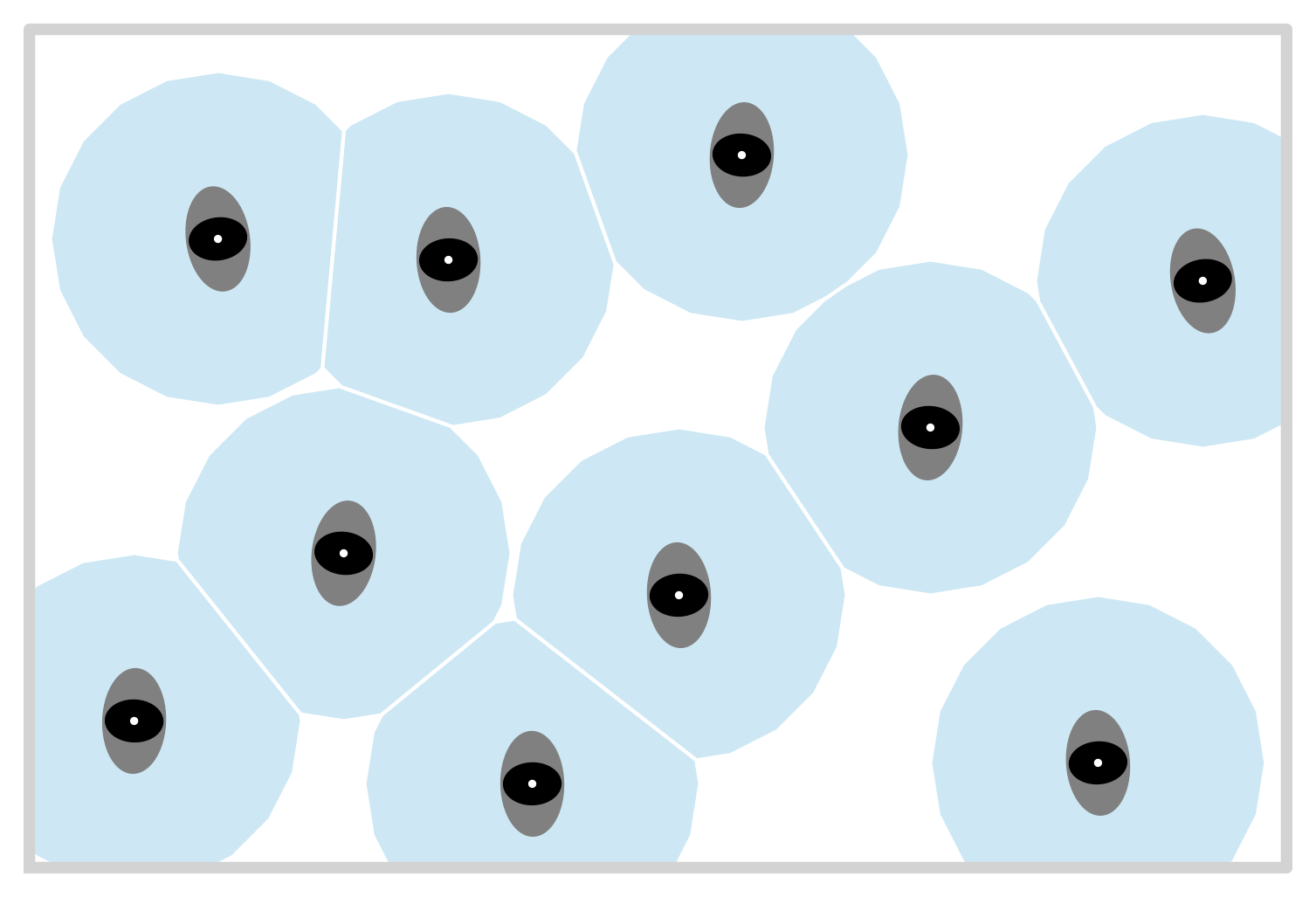
Using this cut off information, the resulting Voronoi polygons would like this:
- Parameters:
traj_data (TrajectoryData) – trajectory data
walkable_area (WalkableArea) – bounding area, where pedestrian are supposed to walk
cut_off (Cutoff) – cutoff information, which provide the largest possible extend of a single Voronoi polygon
use_blind_points (bool) – Deprecated. This parameter has no effect and will be removed in a future version. The underlying Voronoi computation now handles any number of pedestrians (including fewer than 4 and collinear configurations) natively via
shapely.voronoi_polygons().
- Returns:
DataFrame containing the columns ‘id’, ‘frame’,’polygon’ (
shapely.Polygon), and ‘density’ in \(1/m^2\).- Return type:
- compute_intersecting_polygons(*, individual_voronoi_data, measurement_area)#
Compute the intersection of the voronoi cells with the measurement area.
- Parameters:
individual_voronoi_data (pandas.DataFrame) – individual voronoi data, needs to contain a column ‘polygon’ (
shapely.Polygon), result fromcompute_individual_voronoi_polygons()measurement_area (MeasurementArea) – measurement area for which the intersection will be computed.
- Returns:
DataFrame containing the columns ‘id’, ‘frame’ and ‘intersection’ which is the intersection of the individual Voronoi polygon and the given measurement area as
shapely.Polygon.- Return type:
- compute_crossing_frames(*, traj_data, measurement_line)#
Compute the frames at the pedestrians pass the measurement line.
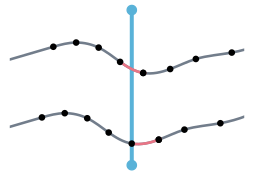
As crossing we define a movement that moves across the measurement line. When the movement ends on the line, the line is not crossed. When it starts on the line, it counts as crossed. A visual representation is shown below, where the movement goes from left to right and each dot indicates the position at one frame. Red highlights where the person has crossed the measurement line.
Note
Due to oscillations, it may happen that a pedestrian crosses the measurement line multiple times in a small-time interval.
- Parameters:
traj_data (pandas.DataFrame) – trajectory data
measurement_line (MeasurementLine) – measurement line which is crossed
- Returns:
DataFrame containing the columns ‘id’, ‘frame’, where ‘frame’ is the frame where the measurement line is crossed.
- Return type:
- is_species_valid(*, species, individual_voronoi_polygons, measurement_line)#
Checks if there’s species data of every pedestrian intersecting the line.
- Parameters:
species (pd.DataFrame) – dataframe containing information about the species of every pedestrian intersecting with the line, result from
compute_species()individual_voronoi_polygons (pd.DataFrame) – individual Voronoi data per frame, result from
compute_individual_voronoi_polygons()measurement_line (MeasurementLine) – measurement line
- Returns:
True if all needed data is provided by the species dataframe else False.
- Return type:
- is_individual_speed_valid(*, individual_speed, individual_voronoi_polygons, measurement_line)#
Checks for speed data in any entry a pedestrian is intersecting the line.
- Parameters:
individual_speed (pd.DataFrame) – individual speed data per frame, result from
compute_individual_speed()usingcompute_velocityindividual_voronoi_polygons (pd.DataFrame) – individual Voronoi data per frame, result from
compute_individual_voronoi_polygons()measurement_line (MeasurementLine) – measurement line
- Returns:
DATA_CORRECT if all needed data is provided by the individual speed dataframe, COLUMN_MISSING if there is a column missing, ENTRY_MISSING if there is no matching entry for a frame where polygon and line intersect.
- Return type: